For gamers and professionals with extensive desk space, the Razer Goliathus Extended Chroma is the best Razer mouse pad for large needs, offering generous dimensions of 920 x 294 x 3 mm and vibrant RGB lighting. This cloth-surface pad provides ample tracking area and aesthetic appeal, making it ideal for those who prefer broad mouse movements and a unified gaming setup. This guide explores several top Razer mouse pads designed to accommodate larger setups, ensuring precision and comfort for every user.
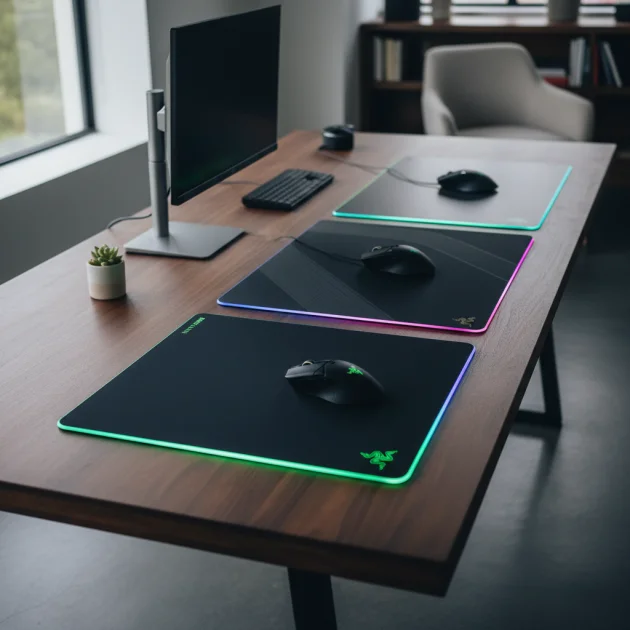
Quick comparison
| Model | Size (mm) | Surface Type | Key Feature |
|---|---|---|---|
| Razer Goliathus Extended Chroma | 920 x 294 x 3 | Soft (Cloth) | RGB Lighting |
| Razer Strider Chroma | 900 x 370 x 3 | Hybrid (Soft/Hard) | Balanced Glide |
| Razer Gigantus V2 3XL | 1200 x 550 x 4 | Soft (Cloth) | Massive Surface |
| Razer Atlas | 440 x 350 x 2 | Hard (Glass) | Ultra-Smooth Glide |
What Large Needs from a Mouse Pad
Large mouse pad users prioritize expansive tracking areas to accommodate low DPI settings and sweeping arm movements common in competitive gaming. A large pad prevents the mouse from running off the edge during critical moments, maintaining uninterrupted gameplay or workflow. Durability is also key, as larger pads often endure more frequent contact across their surface. The material must resist fraying and maintain consistent tracking properties over time. For those with large desks, a pad that covers a significant portion of the surface can also unify the aesthetic, providing a cohesive look and feel. Stability is crucial; a non-slip rubber base is essential to prevent the pad from shifting during intense use. Furthermore, the surface texture must offer a balance between speed and control, catering to different gaming styles and professional tasks. A smooth, low-friction surface allows for rapid mouse movements, while a slightly textured surface provides the necessary stopping power for precise aiming. The thickness of the pad also contributes to comfort, cushioning the wrist and forearm during long sessions. For see our gaming recommendations on this site.
Detailed Reviews
Razer Goliathus Extended Chroma
The Razer Goliathus Extended Chroma is an excellent choice for users seeking a large mouse pad with added flair. Measuring 920 x 294 x 3 mm, it provides ample space for both keyboard and mouse, creating a unified gaming surface. Its micro-textured cloth surface is optimized for all mouse sensors, delivering a perfect balance of speed and control. The pad features vibrant RGB lighting customizable through Razer Synapse, offering 16.8 million color options and various lighting effects. This allows users to synchronize the pad’s lighting with other Razer Chroma-enabled devices, enhancing the overall aesthetic of their setup. The non-slip rubber base ensures the pad stays firmly in place, even during aggressive mouse movements. The Goliathus Extended Chroma is also designed for durability, with anti-fraying stitched edges that prevent wear and tear over time. This pad combines functionality with visual appeal, making it a popular option for large setups.
Razer Strider Chroma
The Razer Strider Chroma offers a unique hybrid soft/hard surface, providing the best of both worlds for large mouse pad users. With dimensions of 900 x 370 x 3 mm, it offers a generous area for expansive mouse movements. The hybrid surface delivers a smooth, consistent glide akin to a hard pad, but with the comfortable cushioning of a soft pad. This makes it ideal for gamers who need both speed for quick flicks and control for precise aiming. Like the Goliathus Extended Chroma, the Strider Chroma features customizable RGB lighting along its edges, powered by Razer Chroma RGB. Its water-resistant surface ensures easy cleaning and protection against accidental spills, extending the pad’s lifespan. The anti-slip base keeps the pad securely anchored to the desk, preventing any unwanted movement during intense gaming sessions. The Strider Chroma is a versatile option for those who demand a balanced performance from their large mouse pad.
Razer Gigantus V2 3XL
For users who truly need an enormous mouse pad, the Razer Gigantus V2 3XL is an unparalleled option. Measuring a massive 1200 x 550 x 4 mm, this pad covers an entire desk, providing an expansive, uninterrupted surface for both keyboard and mouse. Its thick, high-density foam with a micro-textured cloth surface is optimized for all mouse sensors, ensuring pixel-precise tracking and a consistent glide. The Gigantus V2 3XL is designed for maximum comfort and control, offering a soft landing for wrists and forearms during extended use. The anti-slip rubber base provides exceptional grip, preventing any movement even on slick desk surfaces. Its minimalist design focuses purely on performance and size, making it a favorite among professional gamers and streamers who require the largest possible tracking area. This pad is built for durability, with robust stitching that resists fraying and ensures longevity, even with heavy daily use.
Routine Fit
A large Razer mouse pad seamlessly integrates into various routines, enhancing both gaming and productivity. For competitive gamers, the expansive surface allows for low DPI settings and wide, sweeping movements crucial for precision aiming in first-person shooters. This prevents the mouse from hitting the edge of the pad during critical moments, ensuring uninterrupted gameplay. Content creators and graphic designers benefit from the consistent tracking surface, which aids in precise cursor control for detailed editing tasks. The large area also accommodates multiple peripherals, such as a full-sized keyboard and a drawing tablet, without cluttering the workspace. For everyday office use, a large pad provides a comfortable and uniform surface, reducing wrist strain during long hours. Its ability to unify the desk aesthetic also contributes to a more organized and focused environment, making it a valuable addition for any user with ample desk space.
FAQs
What are the benefits of a large mouse pad?
Large mouse pads offer several key benefits, primarily an expansive tracking area that supports low DPI settings and broad mouse movements, crucial for competitive gaming. They prevent the mouse from running off the edge, ensuring uninterrupted gameplay. Additionally, they provide a comfortable, uniform surface for both the mouse and keyboard, reducing wrist strain and enhancing overall desk aesthetics. The increased surface area also allows for more fluid and natural arm movements, which can improve precision and reduce fatigue during long sessions. Many large pads also feature durable, anti-fray stitching and non-slip bases for enhanced longevity and stability.
How do I clean a large Razer mouse pad?
Cleaning a large Razer mouse pad typically involves gentle methods to preserve its surface and integrity. For cloth pads, use a damp cloth with a small amount of mild soap or a specialized mouse pad cleaner. Gently wipe the surface in circular motions, then rinse with a clean, damp cloth. Avoid harsh chemicals or abrasive scrubbing. For hard or hybrid pads, a simple wipe-down with a damp cloth is usually sufficient. Always allow the pad to air dry completely before use. Regular cleaning helps maintain optimal tracking performance and extends the lifespan of the pad.
Are large mouse pads suitable for all desk types?
Large mouse pads are generally suitable for most desk types, provided there is sufficient surface area to accommodate their dimensions. They are particularly well-suited for large gaming desks or L-shaped desks where users have ample space. However, for smaller desks, a large pad might overhang or create a cluttered appearance. It’s essential to measure your desk space accurately before purchasing a large mouse pad to ensure a proper fit. Some users might prefer a smaller, more compact pad if desk real estate is limited, even if they desire a large tracking area.
What is the difference between soft and hard large mouse pads?
Soft large mouse pads, typically made of cloth, offer more control and comfort due to their slightly textured surface and cushioning. They are ideal for precise movements and long gaming sessions. Hard large mouse pads, often made of plastic, aluminum, or glass, provide a faster, smoother glide with minimal friction, favoring quick, sweeping movements. Hybrid pads combine elements of both, offering a balanced feel. The choice depends on personal preference and gaming style; control-oriented players often prefer soft pads, while speed-focused players lean towards hard surfaces.
Can large mouse pads improve gaming performance?
Yes, large mouse pads can significantly improve gaming performance, especially for players who use low DPI settings. The expansive surface allows for greater freedom of movement, enabling more precise and consistent aiming without needing to lift and reposition the mouse. This reduces fatigue and allows for more fluid tracking. The consistent surface texture across a large area ensures reliable sensor performance, eliminating inconsistencies that can occur when a mouse moves between different surfaces. Ultimately, a large mouse pad provides the physical space and consistent tracking necessary for optimal competitive play.
Verdict
Choosing the best Razer mouse pad for large setups depends on individual preferences for surface type, features, and overall size. The Razer Goliathus Extended Chroma stands out for its balanced performance and vibrant RGB lighting, offering both ample space and aesthetic appeal. For those seeking a hybrid surface with exceptional glide and control, the Razer Strider Chroma is an excellent alternative. However, for the ultimate in expansive tracking area, the Razer Gigantus V2 3XL remains unmatched. Each of these options provides the durability, stability, and consistent tracking performance expected from Razer, ensuring an enhanced experience for any large mouse pad user.
Frequently Asked Questions
What are the primary benefits of using a large mouse pad?
Large mouse pads offer an expansive tracking area, which is crucial for competitive gaming with low DPI settings and broad mouse movements. They prevent the mouse from running off the edge, ensuring uninterrupted gameplay. Additionally, they provide a comfortable, uniform surface for both the mouse and keyboard, reducing wrist strain and enhancing overall desk aesthetics.
How should I clean my large Razer mouse pad to maintain its quality?
To clean a large Razer mouse pad, use gentle methods. For cloth pads, wipe the surface with a damp cloth and a small amount of mild soap, then rinse with a clean, damp cloth. For hard or hybrid pads, a simple wipe-down with a damp cloth is sufficient. Always allow the pad to air dry completely before use to maintain optimal tracking performance.
Are large mouse pads suitable for all desk sizes and types?
Large mouse pads are generally suitable for most desk types, provided there is sufficient surface area to accommodate their dimensions. They are particularly well-suited for large gaming desks or L-shaped desks. However, for smaller desks, it's essential to measure your desk space accurately before purchasing to ensure a proper fit and avoid overhang or clutter.
What distinguishes soft large mouse pads from hard large mouse pads?
Soft large mouse pads, typically made of cloth, offer more control and comfort due to their textured surface and cushioning, ideal for precise movements. Hard large mouse pads, made of materials like plastic or glass, provide a faster, smoother glide with minimal friction, favoring quick, sweeping movements. Hybrid pads combine elements of both, offering a balanced feel.
Can a large mouse pad genuinely improve my gaming performance?
Yes, a large mouse pad can significantly improve gaming performance, especially for players using low DPI settings. The expansive surface allows for greater freedom of movement, enabling more precise and consistent aiming without needing to lift and reposition the mouse. This reduces fatigue and ensures reliable sensor performance across a consistent surface, which is vital for competitive play.
Get our weekly buyer guide
Practical specs, not advice. Unsubscribe anytime.

I got the Razer Gigantus V2 3XL because I really needed a massive surface, and it certainly delivers on size. However, I’ve noticed it picks up dust and lint pretty easily, which is a bit annoying to clean constantly. The soft cloth surface is comfortable, but I was hoping for something a little less prone to collecting debris. It’s okay, but not perfect.
I finally upgraded to the Razer Goliathus Extended Chroma and it’s everything I hoped for. The RGB lighting really ties my whole setup together, and the size is perfect for my large desk. I used to constantly run off my old pad, but now I have so much room for wide mouse sweeps in games. Definitely recommend it if you’re looking for both style and function.
The Razer Strider Chroma is a solid choice. I was looking for something with a balanced glide, not too fast, not too slow, and this hybrid surface delivers. It’s a good size too, though I do wish it was a little wider like some of the other options. Still, it feels really durable and my mouse tracks perfectly on it.
My old mouse pad was just too small for my gaming setup, and the Razer Goliathus Extended Chroma has been a game-changer. The 920 x 294 x 3 mm dimensions are fantastic, giving me all the space I need for both my keyboard and mouse. Plus, the soft cloth surface feels great and my mouse glides effortlessly. Super happy with this purchase!